


Video
► Download and details: DCS Kneboard Pack page
Since the module has not yet been released, the information presently included may turn out to be redundant later; but fear not, this pack will be updated and upgraded and will evolve over time.
So far, I have included only a handful of pages; several are work-in-progress and require some checks with the version of Phantoms we will receive.
Compared to my previous pack, I decided to drop the old raster images I have been using for a decade or more and move to vector images. This allows me quicker editing and flexibility when exporting. The images included in the F-4 Phantom II pack are, in fact, much bigger than the ones used in the Tomcat’s pack, in terms of size and resolution. Players can now adjust and resize the kneeboard page in-game without losing quality.
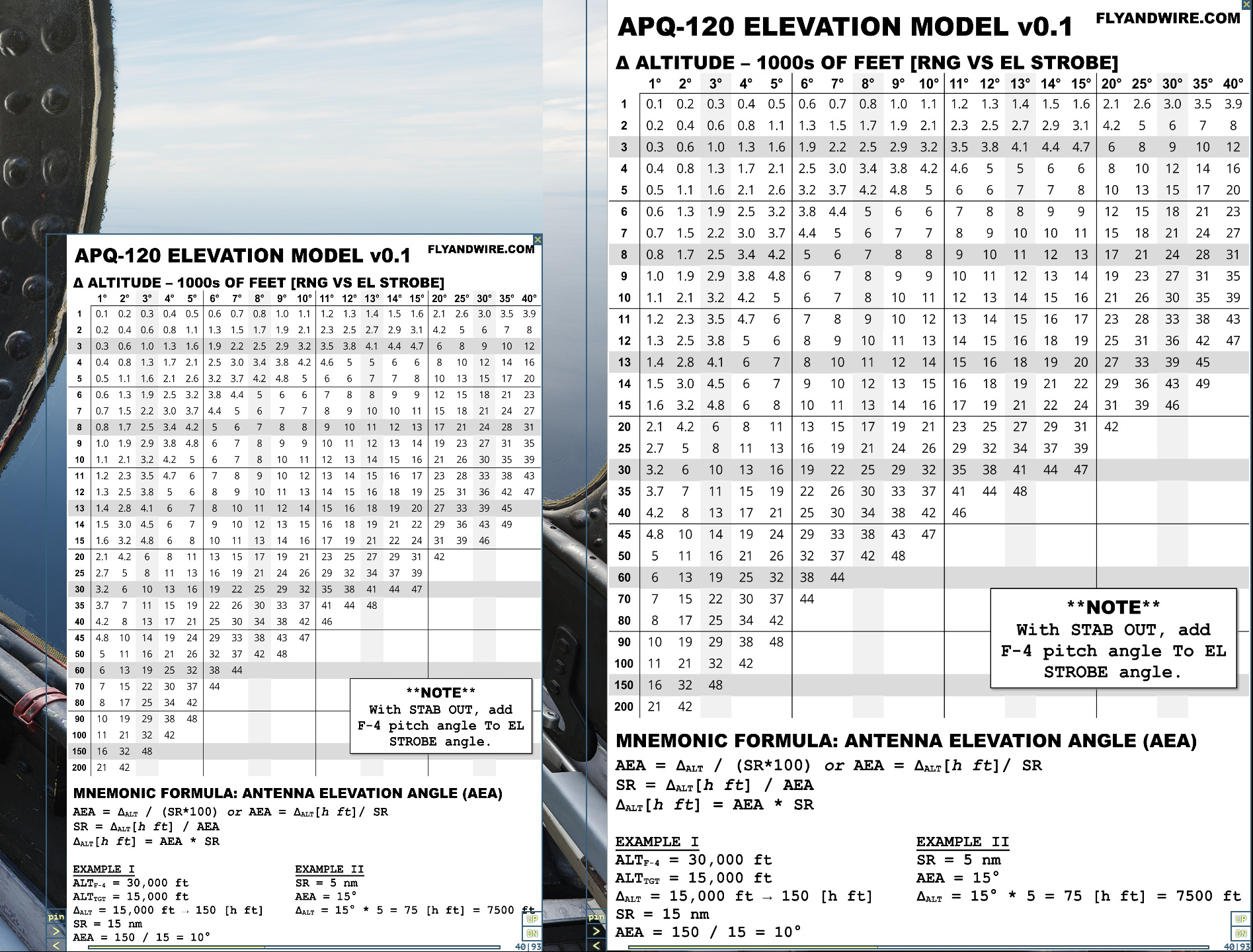
The first page is the good old Antenna Elevation Angle. This represents the angle at which the antenna should be pointed in order to illuminate a target given range and altitude.
For instance, a Controller may provide information in BRAA format with a range of 30 nm and a target’s altitude of 17,000 ft. Imagining our Phantom’s altitude to be 10,000, this gives us a delta altitude of 7,000 ft. Rapidly intersecting the values, we find that the antenna should look up by circa 2° to find the target.
The page also includes mnemonic formulas to obtain the antenna elevation angle or delta altitude using simple maths.
The second page is fundamentally the inverse of page one. It can be useful to assess the target’s altitude when a return is spotted on the radar display. For example, if the antenna is looking up by 3° and the range is assessed, using the display scale and the reference grid, to be circa 20 nm, then the altitude is 6,000 higher than our Phantom. This information can be broadcast to other flights or Controllers.
Page three is similar to Page two, showing a chart inspired by the actual documentation, as are several of the sketches used in this and the following pages. Most of these charts have been featured in the Phantom Phamiliarisation video series and may be preferred by some players.
In the area below, I added information about the Stab switch since this option is o feeten misunderstood in the Tomcat.
The fourth page recaps some of the options and settings for the APQ-120 radar. In particular, information about when the nutation is triggered and the volume of airspace this technique allows to cover, and multiple bars settings.
The fifth page recaps the CAA mode, the acronym for Computer Automatic Acquisition, and shows the airspace covered and the scan pattern of this mode. I have also added a recap of the functions associated with the pinky switch located on the throttle, which controls the selected air-to-air weapon and defines the CAA corridor.
More pages are almost completed, including checklists, such as one dedicated to the employment of AIM-9 Sidewinder and AIM-7 Sparrow, additional radar functionalities, and related options.
Example:
[user]\Saved Games\DCS.openbeta\Kneeboard\F-4E
The “F-4E” folder may not match the name used by the actual module.
 FlyAndWire